|
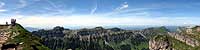
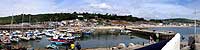
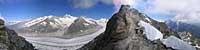
It is not difficult to make a panorama without using expensive equipment. Many of those at 360panoramas.co.uk were taken with a Canon PowerShot A650-IS. Some were taken on the spur of the moment, hand-held, and without a tripod. The individual shots will need to be stitched together by computer using freely available software such as as Canon's 'PhotoStitch' which is supplied free with most Canon PowerShot cameras,'Serif PanoramaPlus SE ', or 'Panorama Studio Pro' etc. If necessary the final panorama can be trimmed and adjusted with a photo editing program such as Adobe 'Photoshop Elements'
The panoramas at 360panoramas.co.uk have been converted from cylindrical panoramic images into interactive 360º panoramas for playback on portable devices, and modern web browsers using HTML5 web coding. With html5 it is no longer necessary to have Adobe 'Flash' installed on your desktop, tablet, or smartphone in order to view these panoramas. To display the panorama on a website you will need a basic knowledge of web page coding. |
|
A very basic panorama can be made without any sophisticated equipment or software just by standing on one spot and taking a series of digital photographs while turning around in a circle. These can then be 'stitched' together automatically using a simple computer program and then viewed by using the horizontal scroll bar. However, there may be problems at the joins between the individual shots, distortion, tilting and curved horizons, and the horizon may move up and down as the picture rotates. |
|
If you do not have a tripod, then you must hold the camera as steady as possible and keep the camera and lens horizontal throughout the full circle. If you tilt the lens than the horizon will be curved. A good tip is to place one foot slightly forward and directly below the lens, keeping your foot over the same spot as you turn around. Check first that you have a clear all round view without anything too close, then take your first shot. Make note of an object at the right hand side of the viewfinder then turn to the right (clockwise) until the same object has moved to the left hand side of the viewfinder. Take another shot allowing a slight overlap, then continue on round to the starting point taking sufficient shots (typically 8 to 12) to complete the picture. If you have a clear horizon such as the sea, then try to keep it horizontal, and passing through the centre of the picture. |
|
|
Download all the shots to your computer and stitch them together with a suitable program making sure you have chosen the '360°' setting. I would recommend starting with 'Serif PanoramaPlus SE', or Canon's 'Photostitch' which is supplied with many Canon digital cameras. Your panorama can then be viewed in a panorama viewer such as Canon's '360° Viewer' , also supplied with Canon cameras. 
|
|
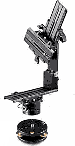
A more professional approach is to use a tripod fitted with an adjustable rotating 360° head which can be levelled in all directions, such as the 'Manfrotto MN303' which is available for around £260 (€325), or the 'Panosaurus' for around £120 (€150) |
|
|
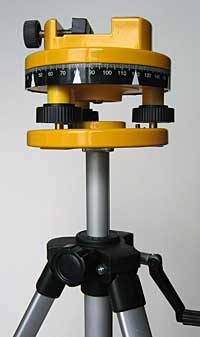
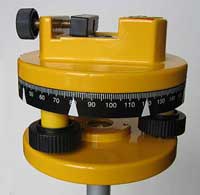
A cheaper alternative is to adapt one of the rotating laser levelling sets which are often available from stores such as Dyas, Aldi or Lidl for around £20 to £30 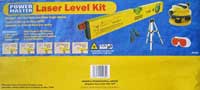 The complete outfit shown here, included a tripod, a fully adjustable and
calibrated 360° metal levelling base with a centre-spot spirit level, a
removable laser level, and a carrying case.
Try and avoid the plastic versions as they are not so rigid.
The seperate laser level is not required .
The complete outfit shown here, included a tripod, a fully adjustable and
calibrated 360° metal levelling base with a centre-spot spirit level, a
removable laser level, and a carrying case.
Try and avoid the plastic versions as they are not so rigid.
The seperate laser level is not required .
Absolutely no modifications are required, except to make a bracket for the camera. |
|
Alternatively, you may still be able to purchase the rotating head seperately. The part was originally known as a 'Stanley Intellilevel Tripod Mount Adaptor 1-77-165 INT177165' |
|
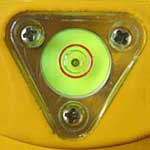
The metal rotating head is extremely robust and fully adjustable with a centre-spot spirit
level, and a strong screw clamp for the camera bracket.
|
|
|
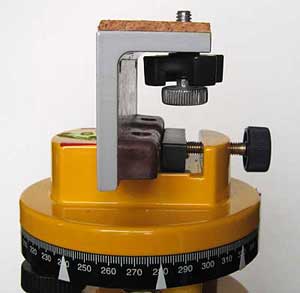
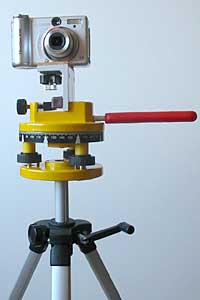
The only thing you will have to do is to make a mounting bracket for your camera, which will be clamped in place of the laser level. This can simply be a piece of 90° rigid aluminium angle about 50mm long, as seen here in grey. The vertical side will need to be packed out to about 20mm thick to fit in place of the original laser spirit level. The horizontal side will need to have a 6mm hole drilled for a standard tripod camera mounting screw, and the surface of the bracket should be covered with cork or felt to protect the camera. The camera screw hole must be positioned so that the HORIZONTAL axis of the lens lies EXACTLY over the central axis of the 360° head. |
|

|
It is also a good idea to put coloured markers around the dial at 30° or 45° intervals depending whether you need 12 or 8 shots to complete the panorama. A useful addition is to remove the 360° head locking screw, which is not required, and replace it with a longer handle such as this one from a kitchen tool, and fitted with an M6 screw. |
|
Parallax: You will now need to correct the 'parallax' error, (the effect you see when you hold up your finger in front of you, look at a distant object, and then close each eye in turn). This is done by setting the 'nodal point' of the camera by sliding the camera bracket backwards or forwards on the 360° head, and is not nearly as difficult as it sounds. Without this correction, the individual pictures will not stitch together perfectly. More details on the nodal point or 'no parallax point' can be found at www.duckware.com. After the nodal point has been found, a mark should be made on the fixing clamp for your particular lens. For instance, with a Canon A650 camera set to wide angle, the nodal point is correctly set when the front of the lens casing is 10mm in front of the axis of the tripod head. |
|
The tripod should be on firm ground with the centre column as vertical as possible. Most importantly, the rotating head MUST be horizontally aligned until it is perfect in all directions, by using the three independent adjustment wheels and the centre-spot spirit level. |
|
|
The strength of the tripod is not too critical as any slight movement between
shots should be taken into account by the stitching program. However, a good
tripod will give sharper pictures and is essential if you need to use long exposures.
If your tripod is not too rigid, then you should use a remote control shutter release, or the self-timer set to a few seconds.
|
|
|
Taking the photos: You camera will have various exposure settings including Program (P), or Manual (M). If you use 'P' the exposure for each individual shot should be correct, but could vary as you turn to different parts of the panorama, making the stitching difficult. This is not a problem with modern stitching programs such as 'Hugin' or 'Panorama Studio', which will smooth out the differences and give excellent results. This setting can generally cope with outdoor shots not looking directly into the sun, and with even lighting all round. Most photographers prefer to use the manual setting 'M' so that each image has the same exposure, making the stitching process easier. However, the brighter shots may be over exposed and the darker ones under exposed, so it is a compromise. To set the manual exposure, first set the shutter to 'P' and point the camera midway between the darkest and brightest parts of the scene. Press the shutter half-way and make a note of both the exposure readings and also the ISO speed. Then use these same values for all the shots with the shutter to Manual. White Balance: It is important to set the camera's White Balance to match the light source, such as Daylight, and avoid using Auto otherwise slight colour changes may occur between images, Set the lens set to its widest angle, i.e. do not use the zoom facility otherwise you will need too many shots to complete the circle. If you have a wide angle lens attachment, then this will require fewer shots. Practise with the camera in 'landscape' mode, then experiment later with 'portrait' mode to obtain more height to the panorama and avoid cutting the tops off buildings etc. First check that the whole 360° view is satisfactory using the viewfinder, which is easier to use in bright light than an LCD display. Try and avoid fast moving objects such as cars, people walking close by, and rough seas etc. which can cause stitching problems. Take all your shots in fairly quick succession allowing time for each to load into the camera's memory. There is a comprehensive website on Panoramic Photography at: www.duckware.com. There are many excellent panorama stitching programs available such as 'PanoramaStudio', and quite a few are free, including the excellent 'Hugin Stitcher' and 'Serif PanoramaPlus SE'.
If you would like to add your panoramas to Google Maps, then here are some hints on |